Monday, March 07, 2011

ActionScript Editing in Flash Builder 4

I've been developing ActionScript for a long time now and have done most of my editing inside the Flash IDE. I've tried other ActionScript editors such as SEPY, but was never satisfied with anything else. Surely, the code hinting, code completion, and overall performance of the ActionScript editor in Flash CS5 is much better than any other version. When writing code that would require a class file, the Flash ActionScript panel now imports the appropriate classes, which is nice.

Recently however, I've been playing around with Flash Builder's ActionScript editor, and I have to say, it's pretty amazing. Not only is there code hinting, but it's almost like coding with the ActionScript library in your hands. Available assets and their definitions appear side-by-side in an expandable view. Classes get imported when needed here too. When you start developing an ActionScript class in Flash, you have the option of developing it in the Flash IDE or in Flash Builder. I'm pretty sure I'll be building them in Flash Builder from now on.


The code coloring in both apps (you think they would be) are not the same though, so for an average Flash user, it takes a while to get used to the code coloring in Flash Builder. Another thing that's a little aggravating about Flash Builder is the way it manages class structure and packaging. I'm sure in time, I'll get used to it.

So out of curiosity, what editor do you use? Can you recommend anything else?

Labels:

Saturday, March 05, 2011

Function with Return values


One of the questions I get most often from students about functions is "What is the :void for?" Indeed, most functions, especialy functions that are derivative of an event listener will have this form:

function someThing(e:MouseEvent):void { }

This is only when a function is not returning a value. Yes, functions can return values and if you think about it, it's kind of a cool way to use functions. We can return numeric or string data from a function. In this quick example, we'll use a function to assemble an address and then trace it out:

function address():String {
 var street:String = "156 Primrose Hill Rd";
 var cityState:String = "Dracut, MA";
 var zip:String = "01826";
 
 var fullAddress:String = street + cityState + zip;
 return fullAddress;
}
trace(address());

Notice here that we use :String instead of :void. This indicates to the compiler what type of data is going to be returned by the function.

Next, we set up a few variables to hold the information for street, city, and zip. We use another variable to pull all of that info together. Then w use the return statement to return the fullAddress variable.

In our trace statement, we actually call on the function to return the value we want. We could also set up the function to return numeric data by datatyping the function to :Number or :int or :uint for that matter.

Labels:

Thursday, September 23, 2010

24 hour - 12 hour conversion in AS3

Getting the current time is easy in AS3 with the Date() class, however the default clock is the 24 hour (military) clock.

Start by creating a new Date object:

var myDate:Date = new Date();

The Date class allows you to get to the month, day, hours, minutes, seconds and other Date-based information. If we try to trace out the time like this:

trace(myDate.hours + ":" + myDate.minutes + ":" + myDate.seconds);

We'll get 16 for the hours at 4 pm. The solution is really simple. Just subtract 12 from the hours to get the 12 hour hour.

trace(myDate.hours - 12 + ":" + myDate.minutes + ":" + myDate.seconds);

Cool!

Labels:

Friday, July 30, 2010

Time Machine to the Rescue

So there's a lot of negative talk out there about Time Machine and yes, I can agree to most of it. Time Machine, OS X's built-in backup program, is a little slim on the configuration options and fills up a hard drive pretty quickly with backups. There doesn't seem to be a lot of flexibility with the program. (If you know of other Mac-based backup solutions, please list them here.)

In the past few weeks however, Time Machine has actually saved me some trouble. A file that I was working with became corrupted or unusable. Then I remembered Time Machine and went into it. Every time I do, my kids' jaws drop as the desktop changes and the spaceship like interface takes over. I went back in history, grabbed an older version of the file and restored it to the desktop. I was then able to open the file and modify it. Of course, I had lost some development time, but being able to resurrect a file like that is really priceless.

So as much as there is negative talk out there, Time Machine really proved useful for me.

Labels:

Thursday, April 22, 2010

Building a Flash Class

Making the transition from procedural (inline) ActionScript to Class-based scripting has been - admittedly - pretty challenging for me. Understanding what's public and what's private, how to structure your code, what are the necessary imports, getting class paths right, there's just so much to think about that normally, with procedural scripting, you don't have to.

For example, importing classes is a complete nightmare of a task. What I discovered of late is that anything that is in the flash class library (ex. flash.display.MovieClip) is already available to you in the Flash IDE. Anything in the fl library (ex. fl.transitions.Tween) isn't, so those need to be imported. Flash CS4 doesn't automatically add the class import statements, but I hear that Flash Builder does and maybe CS5 will.

With procedural scripting, the objects that you are talking to; movie clips, buttons, textfields, are all there on the timeline, so there's no mystery going into it. Everything is right there. Most classes, as perfectly as they are built, will require additional code in the FLA anyway.

I know about all of the benefits of class-based programming and it must be great to build modular code that is reusable - especially when you are working on a team - but I'm a one man show here.

So, I ventured to try to create a simple example of a class file to illustrate how to program and test it.

Begin by starting a new ActionScript file in Flash. Save it as NameCaller.as. When you're building a class, the name of the class is the same name as the name of the file. We'll start by writing out a typical class package:


package {
public class NameCaller extends MovieClip {
public function NameCaller() {

}
}
}

Save the file.
Start a new Flash ActionScript 3.0 file and also save it as NameCaller.fla. be sure to save it in the same location as the NameCaller.as class file. In the Properties panel, you'll see a Class field. This is the document class. Enter NameCaller and hit enter. You shouldn't see any warnings or errors when you do this. If you do, then you may have not saved the files in the same place.

In the Flash file, add a dynamic textfield to the stage and give it an instance name of output. Save the file and return to the NameCaller.as class file.

This really basic example will simply concatenate two variables with a sentence and display it in the dynamic textfield.

Since the class extends the MovieClip class, we'll have to import that class. At the top of your script, after the package declaration, add the following:

import flash.display.MovieClip;


How do you know when you need to import something? Well, if you see compiler errors that complain about it, then you'll have to add them.

Next, we'll define our variables. In the class definition, add the following:

public var fname:String;
public var expletive:String;


Variables and functions can either be private or public. This has to do with security and access rights. Since these variables are public, we can use them outside of the class, such as in our fla file.

Every class has methods (functions) in it, but there's one method that is required, which has the same name as the class. Add the following to the NameCaller function:

init(fname, expletive);


We're going to define the init function now. I've seen this in common practice - that the main function isn't doing much other than calling on another function.

Now, we can define the init function:

public function init(fname:String, expletive:String) {
output.text = fname + " is a complete " + expletive;
}

We've given this function two parameters: fname and expletive. By doing this, we can set those parameters when we call on this function later in the fla file. The dynamic textfield will receive the full message.

Be sure to save the class file and then go to the Fla file. In the Actions panel, add the following:

init("Joe Biden", "Asshole");


We don't have to import the class because it's a document class. Here, we didn't use a class path and save the file in an obscure location, as in the following example:

com.un.necc.ess.ary.long.path.name


We just saved the class file in the same location as the fla. If we were building a complete application that required multiple classes, then we would need to explore that more, but this is just a simple example.

When you test your Fla file, you should see the concatenated statement in the dynamic textfield.

Homework: Try adding input text fields that would allow users to enter in a name and expletive. Try adding a Combo box component that allows users to pick an expletive.

Here's all of the code for the class:


package {
import flash.display.MovieClip;

public class NameCaller extends MovieClip {

public var fname:String;
public var expletive:String;

public function NameCaller() {
init(fname, expletive);
}
public function init(fname:String, expletive:String) {
output.text = fname + " is a complete " + expletive;
}
}
}

Labels:

Wednesday, April 14, 2010

New Features of Flash CS5

So Adobe announced CS5 on Monday. I thought the presentation was pretty cool, but somehow, I was expecting more new features. All of the apps are now 64-bit, which will give it a great speed performance. As far as Flash goes, the new features are:

Text boxes that behave like those in InDesign. You can link text boxes together so that text will flow throughout them.

Spring feature of the Bones tool. Allows you to set a strength and dampening setting so that the bones objects bounce and behave like they are reacting to an external force.

There's a publish setting in Flash to publish to the iPhone. I've talked about this before, but Apple isn't going to allow this moving forward.

Terry White demonstrates the new features in this video:

Labels:

Friday, March 19, 2010

Problems with the new Motion Tween model in Flash CS4

In this video, I'm talking about some of the challenges and differences between Classic Tweening and the new Motion Tween model in Flash CS4, particularly with Reversing Keyframes and Property Keyframes. Enjoy.

Problems with Motion Tween Model in Flash CS4 from Al Lemieux on Vimeo.

Labels:

Thursday, November 12, 2009

Flash Fonts in Library

So we all know that you can embed a font directly into the Flash Library by clicking on the Library options menu and choosing New Font... Then you can specify which typeface and style and faux attributes, if you want. My understanding of this feature was that Flash actually somehow held onto that font, so that - for example - if you had to share your FLA file with someone who didn't have that font, they would be able to use the one in the library. Turns out that ain't true.

If you embed the font into the library, but then use a font utility to disable the font for the system, then Flash can't actually render the font. So I'm wondering what's the point then? Sure, you can programmatically call on that font and use it with ActionScript to create a TextFormt, for example. But again, only if the font is available system wide.

Labels:

Monday, October 26, 2009

Wading into Adobe Certification

Adobe offers a few different certifications for its users. There's the ACE (Adobe Certified Expert), ACA (Adobe Certified Associate), and ACI (Adobe Certified Instructor). Each certification has its own testing criteria and benefits, which for the most part are obvious. The newest of the three, ACA is the entry-level certification. Kind of like the Microsoft MOUSE exam.

Recently, I've been researching the whole ACA program, its curriculum, the exam, and resource materials, in preparation for taking the exam with the hopes of becoming an ACA instructor - someone who's qualified to teach Adobe programs to students with the idea in mind that they will be prepared enough to become certified. This all sounds well and good until you dig a little deeper.

On the surface, it sounds like the ACA exam is open up to anyone who's interested in being certified at a user level in Adobe products. The ACA certification is handled by a company called Certiport. The Certiport website has information about a bunch of Microsoft tests and test facilities. When it comes to the ACA test, the site becomes mysterious and even unusable. Sure, there's a little information about the test and what its benefits are, but when you actually start drilling down and trying to find information about how to actually take the test, it becomes absurd.

Come with me and let's see what we can find:

Start by going to www.certiport.com.
Click on the Adobe logo that says Adobe Certified Associate. On the left hand navigation you'll see links about each test, some resources, FAQs, success stories, some PDFs that show the path of each certification for individuals and institutions. All promising, but where's the link to actually take the test? Not there.
Click up at the top where it says 'Get Certified', maybe the link is in there. Nope. There's some more information about why I should get certified and the types of certifications, blah, blah, blah.
There's a tab up at the top that says 'Certifications'. I click that and I see the Adobe logo again. Click on that and it takes me back to the page I was on before.
There's a Registration tab up at the top, maybe I have to register to take an exam. Seems odd, but I'll give it a try. Here, there's a big button that says 'Register for a Certification Exam'. Perfect, that's what I'm looking for.
Fill out the form on the next page and click Next. Continue filling out the form.
After getting a login, I'm taken to a page that has an additional tab, My Certiport. I see at the bottom that I have to purchase a voucher for an exam. I'll click on that.
This takes me to a page that has 6 Microsoft vouchers and 0 Adobe vouchers. Hmm? Something isn't right here. I try all of the other links here and it looks like I'm at the end of the line. There's absolutely NO information about the ACA exam. What do I do now?
I figure, 'I must've missed something at the Certiport site.' I go back there and under the Take an Exam tab, there's a Testing Center Locator link. I try that. I enter the ACA exam and the zip code for the nearest testing center. The page returns 4 results, all of which are local high schools, some as far away as Rhode Island and Connecticut, some 40+ miles out of my way. Each link to each testing center takes you to the individual high school site with no visible information about certification. OK, another dead end.
So now I go back to the Certiport site again and this time, I'm looking for contact information. I can't see a Contact us link anywhere. I see a link called About Certiport with an overview of the company. There's a tab up there called Contacts, so I click that. Now, I'm offered three choices, Support and Customer Services, Headquarters, and Sales Consultants. There's no 1-800 number listed or a general email. I click on Sales Consultants, because I figure, they must be involved in selling the actual exam or the vouchers for the exam. They have a little map with the following links: U.S. Regional Sales - Certiport & Microsoft, U.S. Regional Sales - Adobe, and Courseware. Adobe, yeah, that's what I need. I click on that. I get a popup with a bigger map that's clickable. I click on my geographical location and I get information for a sales person in my area. I send him the following email:

Mr. Smith,

I am trying to find out where I can purchase a voucher for the Adobe ACA test. Can you please direct me?

Thanks.

He replies with the following:

Al, we only sell voucher through our testing centers. Here is the link to find one in your area. http://www.certiport.com/Portal/Pages/LocatorView.aspx

They should be able to help you.

So, going to the Certiport site to register for an Adobe ACA exam is useless. I have to contact the actual testing center. I find one of the ones that were listed before and call them. It's a high school about 20 miles away from where I am. I get the school office. When I ask them about certification, they transfer me to the Principals office. When I ask them again, they transfer me to their Data Center - their equivalent to technical vocational computer training. I get a young student on the phone who has no idea what I'm talking about and then hands the call off to a teacher. She informs me that the test is only available to students in her program and no one from the outside can take the test there.

WTF?

So, I send another email to that sales rep telling him of my experience, and I haven't heard anything back.

So for all of the hyperbole that Adobe is driving behind the benefits of taking the test, all of the energy that went into researching the curriculum, purchasing resource materials to prepare myself for the exam, the frustration of using an unuseable site and all of its dead ends, and now having no where to take the exam, I'm losing faith in the certification procedure.

So I'm thinking now that maybe the ACA exam was specifically set up as an equivalent to some of the basic Microsoft tests that are geared towards students, not professionals. That part is understood, but one of the requirements of becoming an Adobe ACA instructor is to actually take one of the ACA exams!!! Of which, I can't actually participate in.

Wake up Adobe!!!

Labels:

Monday, September 21, 2009

Flash CS5 Features Revealed

At the recent FOTB (Flash on the Beach) conference, senior Adobe Flash product manager, Richard Galvan, revealed some of the new features of Flash CS5 - due to come out who knows when. Hopefully, not that soon. The information is sketchy at this point, but Adobe is continuing its efforts to tighten up the Flash platform and address the slow adopting of AS3.

In the sneak peak, Galvan showed integration (finally) of Flash and Flash Builder (formerly known as Flex - although most Flex developers will still refer to it as that). You can now export from Flash your projects as Flash Builder projects and you can go from Flash Builder back to Flash. I think this is a key strategy in pulling together the technologies, since this has kind of presented a split in the Flash camp between designer/developer.

For AS3, there's a new code samples panel, which acts similar to the behaviors panel - which was made useless in a Flash AS3 project. Well, now you can actually use these samples (snippets) in your projects using ActionScript 3. I think Adobe's really trying to get everyone to adopt AS3, so they can continue developing its features.

Finally, there have been improvements made to the text features in Flash to aid text layout. This is a long-time coming thing. Editing and placing text in Flash has been pretty painful in the past and the functionality is different from something like Adobe Illustrator, different enough to make you scratch your head. There's also changes that have been made to the Art Deco tool. I didn't even think that would be a primary focus for anyone in the Flash world, but apparently, Adobe thought they should make it better.

There are more mobile featurs in this version and they announced increased adoption of Flash Player 10 to a figure that's over 90%.

I'm really encouraged by these changes and I can't wait to get my hands on a beta copy and start deconstructing it. Hopefully, this new release will get developers to realize the power of AS3 so they can start utilizing its features.

Labels:

Thursday, September 10, 2009

Why people hate Flash

Keith Peters (author of Object-Oriented ActionScript 3.0 and others) has a great post about 'why people hate flash.' What's great about this is Keith's responses to each objection. I particularly have experienced this kind of sentiment in the classroom and the workplace.

There are right and wrong uses of Flash out there and it really depends on who's developing the site/project to bring out the full potential of Flash without all of the catch all's and don'ts.

What I have noticed lately are two examples of sites that I have used for a while now that have transitioned from Flash to an HTML/JS/CSS solution. The most shocking of these is Adobe TV. The site was a Flex site for the longest time, but recently has switched. Keith mentions in his post how large Flex sites can become and I can imagine all of those video assets building up file size too.

Another site that was all Flash, My Coke Rewards, had a lot of the difficulties listed in Keith's post. It seemed like logging in took forever and the site components took a long time to load, to the point that it was painful. Now the site comes up a lot quicker and communication is better.

The other curious point that I have to bring up is that a majority of major corporations have all Flash sites. Listings of the top 100 sites and such point to Flash sites more so than HTML sites - for good reason, I believe. The potential for greatness is there, it's what the developer does with it. The Ford 2010 Mustang site for example, is absolutely amazing.

I don't think Flash is going away, but it is getting a lot of competition these days, which is good for Adobe.

Labels:

Wednesday, August 12, 2009

Interesting Facts About Flash Cookies

You may know that JavaScript Cookies exist and they hold bits of information about a browser session for a site that you visit regularly. These cookies eventually expire and are pretty innocuous. On the other hand, Flash has its own kind of cookie, although it's not called that, but exists for similar purposes.

According to this article at MACNN, Flash cookies could pose some privacy issues because they are not as easy to delete via the browser. Flash cookies are larger than JavaScript cookies (100Kb as opposed to 4kb).

I can already see Microsoft saying I told you so. There's probably a similar mechanism in SilverLight, but I can't confirm.

A majority of the time, these Flash cookies aren't storing or retrieving sensitive information, but who knows. I'm sure Adobe is all over this. What do you think?

Labels:

Tuesday, August 11, 2009

The Future of ActionScript

There's a great post over at FlashDen today about the problems with ActionScript and its future. As a Flash instructor, the hardest thing about teaching Flash is ActionScript. ActionScript 3 made that only the more difficult.

The hurdles I've had to face transitioning from AS2 to AS3 were pretty high and it took a while to get acclimated. For a student who's had little to no exposure to Flash and scripting languages of any kind, it's almost impossible for them to even grasp what's going on.

Sure AS3 is awesome and the benefits of a stricter language offer performance improvements and such, but how does that translate to the average user? What's the ideal learning path for someone just learning Flash? How do I become a Flash Developer and move to the next level? It's not something that comes quickly or easily. The language is more involved and there are still syntax issues.

The articles contributors sum it up pretty good. It's amazing to me how many people are still developing in AS2 and prefer to. It's indicative a shift in the direction of the language towards an extreme that may just be too difficult for some to wrap their brains around.

Labels:

Friday, June 12, 2009

AS3 Keyboard Events

Learn how to respond to and listen for Keyboard Events in AS3.

Labels: , ,

Monday, June 01, 2009

CS4 Backward Compatibility

CS4 Backward Compatibility

CS4 has been around about nine months now and so everyone should’ve upgraded, right? Well, not exactly. The adoption rate has been a little slow this time ‘round, given the economy and for some, a lack of compelling reasons to upgrade. Adobe has been on a spree lately, getting the CS4 word out there and working with their evangelists to create compelling reasons to upgrade.


So let’s say that you did upgrade and now you’re in a situation where you are working with a client that is still in CS3 land. Inevitably, you’ll run into compatibility issues. This article will help you navigate that particular topic.


InDesign


InDesign has had a built-in, cross-product file format since CS2. An INX file is basically an XML file that describes how an InDesign document has been created and all of its linked assets.

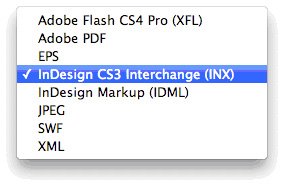
In InDesign, when you go to File > Save As, you won’t be able to save down to CS3, you can only save as a CS4 document or template. However, if you go to File > Export, you’ll find the InDesign CS3 Interchange (INX) file format. Export as this file format to send to anyone who’s on CS3.

A word of warning, linked assets and fonts are not bundled with the INX file, so you’ll have to send those along as well. In InDesign CS3, simply go to File > Open and open the InDesign file.


Illustrator


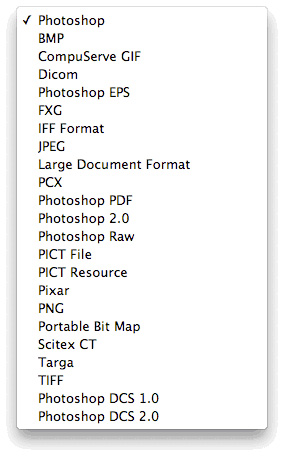
Illustrator has also always featured a cross-compatibility file format in the Illustrator Save Options dialog. You won’t find a Illustrator CS3 option under File > Save As, but you will find multiple formats in the Options dialog.

As you can see, you can go back as far as Illustrator 3.


A little warning here is that some of the transparency effects and the new gradient transparency feature will not be backward-compatible. Also, since Illustrator CS4 supports multiple artboards, opening a file like that in CS3 will be problematic. You may have to save each artboard as a separate file.


Photoshop


Photoshop backward-compatibility is also built-in to the current version of the program. When you save a Photoshop file, you might see this dialog:

You can enable file compatibility options in the File Handling preferences. All you need to do to save the file is choose the Photoshop format from the file format drop-down:

Again, certain features will not be supported in CS3, but a majority of the file will be useable.


Flash


Flash actually does allow you to save down to the CS3 format. Just choose File > Save As and you can use the CS3 file format.

What you’ll lose here is the Motion Tweens you create in CS4 will be translated into Classic Tweens in CS3. ActionScript hasn’t changed much (Flash is still using AS3), so there’s not much to worry about there. Your easing values might be different, since CS4’s Motion Editor is more robust than simple easing in CS3.


Summary


You may find people still on CS2 or on other versions of the Creative Suite. At that point, backward-compatibility becomes more difficult. There may be other approaches of working with older documents. For example, InDesign allows you to place InDesign files and PDF documents. So you may be able to import older files into CS4 as a starting point. Going backwards though, not so easy.

Labels: , , , , , ,

Thursday, April 30, 2009

Make SWF File Smaller

Eltimer's Flash Optimizer can make SWF files 80% of their original size. Although Flash optimization is great, this utility offers precise control over what is being compressed. At $99 it might be worth looking into.

Labels: , , ,

Monday, April 27, 2009

ActionScript 3.0 Migration Cookbook

If you've been holding off on moving to AS3 or have felt that AS3 is too difficult to learn, Adobe wants you to migrate. To help you do so, they've published a migration guide: "ActionScript 3.0 Migration Cookbook." Check it out and please, make the switch.

Labels: ,

Thursday, April 23, 2009

New Flash SEO Course on Lynda.com

There's a new Flash course on Lynda.com about search engine optimization: http://usingflash.blogspot.com/2009/04/lyndacom-has-new-flash-seo-course.html

Labels: , , ,

Wednesday, April 08, 2009

Griping about Adobe Help

Application program Help is all over the place on the Mac platform. Sometimes, you'll see the standard OS interface, other times, it will be a proprietary interface, and in Adobe's case (for CS4 that is), it's all web-based.

Yes, that's right, CS4 help is web-based. Now at first glance, that may sound ideal and when you first try it, you might be impressed to find that any search will return results not only from the Adobe website, but anywhere on the web.

However, this can be a hindrance and not help. If you use a focused search on something like "Knife Tool", in Adobe Illustrator CS4, you may get some results that are directly about CS4 and some that aren't. In earlier versions of Adobe products, the Help file would be only about that particular product. It becomes more frustrating in Flash, when you're doing searches on ActionScript particulars. I thought the earlier help tools were much more helpful, though maybe not as broad, than the current version.

The most frustrating thing about the new help system is that, if you don't have an internet connection, you can't get help! That just doesn't seem right.

What are your thoughts?

On another note, it's been a while since I've posted here. I've been posting at my other blogs:
http://usingflash.blogspot.com
http://usingillustrator.blogspot.com
http://usingindesign.blogspot.com
http://usingphotoshop.blogspot.com

I'm also feature in another blog from the school where I'm currently teaching:
http://www.cdiabu.com/blog


Finally, I'm also blogging for my place of work at:
http://boggse-learningchronicle.typepad.com/the_online_conte/
in the Tricks and Tips for CSS, Flash, XHMTL Category.

Labels: , , , ,

Wednesday, June 13, 2007

CS3 Creative License Conference

I went to the Adobe CS3 Creative License conference yesterday at the Hynes convention center in Boston and was splendidly surprised at all the whiz bang of it. Aside from the presentations, they gave us a whole month's worth of training from Lynda.com. Plus, the people at On1 software gave us $400 worth of plug-in software for Photoshop CS3! In our little Adobe bags they also included a DVD version of the video workshop which includes video tutorials for all of the products in the creative suite. Well worth the $79 price for attendance.

First up, Terry White gave us an overview of the entire suite. He got a lot of oohs and ahhs from the audience by showing the new Quick Select tool in Photoshop, Smart Filters, and the ability to load and play video files. There were some cool new features in Contribute that allow you to edit and update a blog. Terry took a couple of snapshots of the audience and then posted live to his own blog. I was impressed with the new version of Premiere and the ability to drag and drop After Effects comps directly into Premiere.

Terry and the next presenter Sebastian, spent a lot of time extolling the goods of Bridge. The new Bridge home has some video tutorials that you can view online. Sebastian then went into all of the cool new features of Camera Raw 4.1 like, parametric curves, clarity and vibrance, and split toning. The wildest thing that he showed though was the Auto Align and Auto Blend features in Photoshop. You can align images on multiple layers. The Auto Blend features works well when stitching together panoramas.

Sebastian then went into Kuler and talked about how you can use it with the Live Color feature in Illustrator. The ability to manipulate colors in a smarter way with color groups in the Swatches palette and the new color guide are going to improve the non-color savvy designers creations. InDesign has some great new transparency and effects. Now you can have transparency for fills, stroke, type, and object. InDesign CS2 only allows object transparency, so this is big.

The web portion of the presentation was particularly weak. The presenter (Kyle) had a lot of difficulty getting anything to work and within a few minutes he had blown his demo completely. It was hard for me to pay any more attention to him because he kept mucking things up so badly. People in the audience had to help him remember things and Terry white had to help him through his demo on FireWorks. He fumbled through the Spry Framework in Dreamweaver, which was a particular bummer. He was able to recoup though, during the Flash portion, showing us the new primitive objects and native Illustrator/Photoshop support. Copying and pasting motion tweens from one object to the next is really great and, of course, copying a tween as ActionScript is even cooler.

Towards the end of the day, it was all about video and Kevan showed us some awesome features in Photoshop. Yes, that's right, I said Photoshop. You can now export from Vanishing Point an image in a special 3D for After Effects VP Exchange format. Once in After Effects, you can treat the object as a 3-D element and do pans and motion. There's an awesome and hilarious new feature in AE called the puppet tool. Kevan took a live action shot of a person doing kung-fu and rearranged the kick of the person to reach out to different locations, kicking away a piece of text. Finally, he showed us some very cool features of SoundBooth, which has some really remarkable audio clean up tools.

All in all, it was a great day of learning and I am very excited about the possibilities. I'm really excited about Flash and After Effects especially.

Labels: , , , , , ,